sudo grub2-set-default 0
sudo grub2-mkconfig -o /boot/grub2/grub.cfg
sudo rebootTuesday, 7 July 2020
vm - Centos - Boot into latest Kernel

Monday, 6 July 2020
vm - Centos Shared Folder
Launch VMware -> Virtual Machine Settings -> Hardware
Enable only one CD/DVD(IDE) -> Tick "Connect at power on" -> Use a physical drive: Auto Detect
Uninstall open-vm-tools
rpm -e open-vm-tools
Manual install VMwave-tools
https://kb.vmware.com/s/article/1018414- To create a mount point, run:
mkdir /mnt/cdrom
- To mount the CDROM, run:
mount /dev/cdrom /mnt/cdrom
- To copy the Compiler gzip tar file to a temporary local directory, run:
cp /mnt/cdrom/VMwareTools-version.tar.gz /tmp/
Where version is the VMware Tools package version.
- To determine the version of VMware tools, run:
ls /mnt/cdrom
You see output similar to:
# VMwareTools-5.0.0-12124.tar.gz
- To change to the tmp directory and extract the contents of the tar file into a new directory called vmware-tools-distrib, run:
cd /tmp
tar -zxvf VMwareTools-version.tar.gz
- To change directory to vmware-tools-distrib and run the vmware-install.pl PERL script to install VMware Tools, run:
cd vmware-tools-distrib
./vmware-install.pl
Sunday, 3 May 2020
[linux] Trial & Error
Walk-Through
| SECTION | SETUP | ||||||
|---|---|---|---|---|---|---|---|
|
|
what is the shell?
ls -l /bin/sh
/bin/sh -> dash
/bin/sh -> bash
/bin/sh -> busybox
Friday, 1 May 2020
[linux] Set Everything Up
Walk-Through
| SECTION | SETUP | ||||||||||||||||||||||||||
|---|---|---|---|---|---|---|---|---|---|---|---|---|---|---|---|---|---|---|---|---|---|---|---|---|---|---|---|
|
|
(INSTALL) PACKAGE
$ apt-get update
$ apt-get upgrade
$ sudo apt install apt-file
$ sudo apt-file update
$ sudo apt-get install install-info
$ sudo apt install vim libncurses5-dev gcc make git git-all git-email gitk esmtp mutt exuberant-ctags libssl-dev bison flex libelf-dev bc build-essential kernel-package fakeroot ccache ncurses-dev alien cscope meld gitk libssl1.1 codespell python-ply qemu qemu-system gdb
$ pip install gitpython
(SETUP) GIT
$ git config --global user.name "John Doe"Email:
$ git config --global user.email johndoe@gmail.com
- Create Google App Passwords
$ vim ~/.muttrc
Example:set realname = "John Doe"
set from = "johndoe@gmail.com"
set use_from = yes
set envelope_from = yes
set edit_headers=yes
set smtp_url = "smtps://johndoe@gmail.com@smtp.gmail.com:465/"
set smtp_pass = {SMPT_APP_PASSWORD}
set imap_user = "johndoe@gmail.com"
set imap_pass = {IMAP_APP_PASSWORD}
set imap_keepalive = 900
set timeout = 10
set ssl_force_tls = yes
set ssl_starttls = yes
bind index G imap-fetch-mail
set folder = "imaps://imap.gmail.com:993"
set spoolfile = "imaps://imap.gmail.com/INBOX"
set header_cache=~/.mutt/cache/headers
set message_cachedir=~/.mutt/cache/bodies
set certificate_file=~/.mutt/certificates
set record = ""
set postponed = "imaps://imap.gmail.com/[Gmail]/Draft"
set editor = "vim"
set charset = "utf-8" - Create Yahoo App Passwords
$ vim ~/.muttrc
Example:set realname = "John Doe"
set from = "johndoe@gmail.com"
set use_from = yes
set envelope_from = yes
set edit_headers=yes
set smtp_url = "smtps://johndoe@gmail.com@smtp.gmail.com:465/"
set smtp_pass = {SMPT_APP_PASSWORD}
set imap_user = "johndoe@gmail.com"
set imap_pass = {IMAP_APP_PASSWORD}
set imap_keepalive = 900
set timeout = 10
set ssl_force_tls = yes
set ssl_starttls = yes
set folder = "imaps://export.imap.mail.yahoo.com:993"
set spoolfile="imaps://imap.mail.yahoo.com/INBOX"
set header_cache=~/.mutt/cache/headers
set message_cachedir=~/.mutt/cache/bodies
set certificate_file=~/.mutt/certificates
set record="imaps://imap.mail.yahoo.com/Sent"
set postponed="imaps://imap.mail.yahoo.com/Drafts"
set editor = "vim"
set charset = "utf-8"$ mutt
Say "no" to creating an inbox for now. Type 'm' to create a new message. Specify your own email address (or a secondary email) to send the test message to. Set the Subject however you want to. Type a message in the body, and then save and quit. Hit 'y' to send the message, hit 'e' to edit the message again, or hit 'q' to abort sending the message.
Look in your email to double check you received a message. If you send the email to yourself, for some mail services like gmail, the message will not show up in your inbox, and you will have to look in your Sent Mail folder.
(INSTALL) SOURCE (CODE)
$ git clone -b staging-testing git://git.kernel.org/pub/scm/linux/kernel/git/gregkh/staging.git
$ git tag -l | less # list out the kernel versions
$ git checkout -b stable tag # Where tag is the latest vX.Y.Z tag you found.
$ git branch test # create branch named test, don't mess up the master branch (tree)
$ git checkout test # select test branch
$ git branch # check if currently at test branch
(FILE)SYSTEM
created rootfs.ext4 with buildroot
$ git clone git://git.buildroot.net/buildroot
$ cd buildroot
$ make menuconfig
Target Options → Target Architecture (x86_64) → (X) x86_64 # run it on x86_64 virtualized system with qemu.
Filesystem images → [*] ext2/3/4 root file system → ext2/3/4 variant (ext4) → (X) ext4 # ext4 file system to be mounted as default file system
$ make -j8 - Build ‘buildroot’ project
The rootfs.ext4 has been created
CLEAN( UP)
Cleaning is done on three levels.$ make clean # Delete most generated files to build external modulesDelete old official kernels from boot loader
$ make mrproper # Delete the current configuration and all generated files
$ make distclean # Remove editor backup files, patch leftover files, etc
$ dpkg -l | grep linux-image- # list out (previous) installed kernels
| ...... rc linux-image-4.15.0-96-generic 4.15.0-96.97 amd64 Signed kernel image generic rc linux-image-4.15.0-99-generic 4.15.0-99.100 amd64 Signed kernel image generic ii linux-image-5.0.0-32-generic 5.0.0-32.34~18.04.2 amd64 Signed kernel image generic rc linux-image-5.0.0-37-generic 5.0.0-37.40~18.04.1 amd64 Signed kernel image generic ...... |
$ sudo apt-get autoremove linux-image-5.3.0-51-generic # autoremove desired kernelDelete Custom Compiled Kernel from boot loader
reboot
$ sudo apt-get autoclean & apt full-upgrade & apt-get dist-upgrade # upgrade everything again
$ sudo locate "*5.5.0-rc6*" | sudo xargs -p -ixxx rm -f 'xxx' # identify the files of kernelsRemove the following files:
$ sudo rm /boot/vmlinuz-5.5.0-rc6+and Finally,
$ sudo rm /boot/initrd-5.5.0-rc6+
$ sudo rm /boot/System-5.5.0-rc6+
$ sudo rm /boot/config-5.5.0-rc6+
$ sudo rm /lib/modules-5.5.0-rc6+
$ sudo update-grub # boot loader as wellNOTE:
"E: gconf2: dependency problems - leaving triggers unprocessed"try:
$ sudo dpkg --configure -a
CONFIG
$ cp /boot/config-`uname -r`* .config # [TRY THIS 1ST] duplicating your current config$ make localmodconfig # utilized existing .config with modules installed
$ make menuconfig # Text-based with colored menus and radiolists.
$ make defconfig # This option creates a config file that uses default settings based on the current system's architecture.
$ make ${PLATFORM}_defconfig - Creates a config file using values from arch/$ARCH/configs/${PLATFORM}_defconfig.
$ make ARCH=x86_64 x86_64_defconfig # pick current kernel setting as base
$ make ARCH=x86_64 menuconfig # add debugging ability in TUI
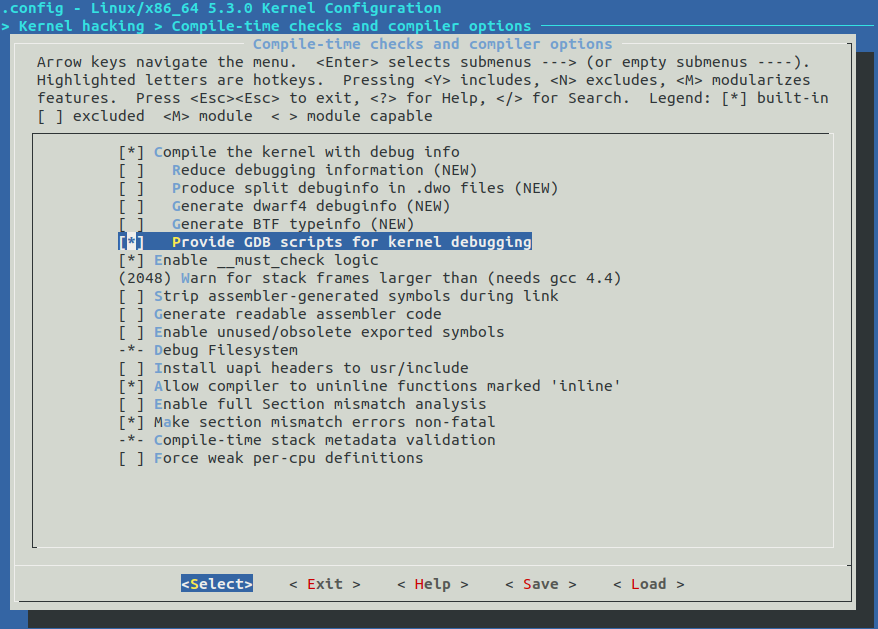
Kernel hacking --->
Compile-time checks and compiler options --->
[*] Compile the kernel with debug info
[*] Provide GDB scripts for kernel debugging (New)
[ ] Reduce debugging information
![[pic-1] Text-Based UI Linux Kernel Configuration tool](https://miro.medium.com/max/888/1*vLDNMaC6RTD-gYOiocf39w.png)

(MODIFY )MODULE
$ lsmod # list out modules says, want to modify e1000e
says, want to modify e1000
| ...... e1000e 123456 0 ...... |
THEN EITHER,
$ git grep e1000e -- '*Makefile' # search the module path
OR
$ modinfo e1000e # find module path
| filename: /lib/modules/X.X.X-XX-generic/kernel/drivers/net/ethernet/intel/e1000e/e1000e.ko version: 3.2.6-k license: GPL v2 description: Intel(R) PRO/1000 Network Driver ...... |
so, the path is drivers/net/ethernet/intel/e1000e
THEN,
$ vim drivers/net/ethernet/intel/e1000e/*.c # open all c files & find probe function
so, the path is drivers/net/ethernet/intel/e1000add a line to printk() to probe function for TESTing,
THEN,
$ vim drivers/net/ethernet/intel/e1000/*.c # open all c files & find probe function
NOTE: ":n" to next file, ":N" return to last file, "/probe" to search keyword "probe"
| struct e1000_hw *hw; # search for probe function by "/probe" in vi ..... static int e1000_probe(struct pci_dev *pdev, const struct pci_device_id *ent) { struct net_device *netdev; struct e1000_adapter *adapter; struct e1000_hw *hw; printk(KERN_DEBUG "DEBUG: Passed %s %d \n",__FUNCTION__,__LINE__); const struct e1000_info *ei = e1000_info_tbl[ent->driver_data]; ..... |
MAKE (INSTALL)
$ make M=drivers/usb/serial -j8 # Build only a portion of the kernel with 4 core CPU$ lscpu # check how many core the pc has
$ make -j8 # Build entire kernell with 4 core CPU
$ sudo make modules_install # Install the Linux kernel modules
$ sudo make install # sudo make install
Ubuntu (Default boot into latest kernel):
$ sudo update-grub2
Centos (Default boot into last kernel):
$ sudo grub2-set-default 0 # set to latest kernel
$ sudo grub2-mkconfig -o /boot/grub2/grub.cfg
$ sudo reboot
RUN
- Reboot
- Hold "Shift" at startup
- Select & Boot with installed kernel
- without debugger:
$ qemu-system-x86_64 -kernel arch/x86/boot/bzImage \
-boot c -m 2049M -hda ../buildroot/output/images/rootfs.ext4 \
-append "root=/dev/sda rw console=ttyS0,115200 acpi=off nokaslr" \
-serial stdio -display none
- with debugger:
$ qemu-system-x86_64 -s -kernel arch/x86/boot/bzImage \
-boot c -m 2049M -hda ../buildroot/output/images/rootfs.ext2 \
-append "root=/dev/sda rw console=ttyS0,115200 acpi=off nokaslr" \
-serial stdio -display none
Login as root (id = root, no passowrd)
# mkdir home # home directory not created by default
# adduser newuser # create normal user account
# exit
login as newuser
TEST
- $ dmesg | less
- type:
/DEBUG: Passed
| [ 2.093005] [ 2.114507] DEBUG: Passed e1000_probe 926 c |
WHAT'S NEXT
NEXTThursday, 30 April 2020
[linux] remove old kernel
Remove Old Kerneldpkg -l | grep linux-image-rc linux-image-4.15.0-74-generic 4.15.0-74.84 amd64 Signed kernel image generic rc linux-image-4.15.0-76-generic 4.15.0-76.86 amd64 Signed kernel image generic rc linux-image-4.15.0-88-generic 4.15.0-88.88 amd64 Signed kernel image generic rc linux-image-4.15.0-91-generic 4.15.0-91.92 amd64 Signed kernel image generic rc linux-image-4.15.0-96-generic 4.15.0-96.97 amd64 Signed kernel image generic rc linux-image-4.15.0-99-generic 4.15.0-99.100 amd64 Signed kernel image generic ii linux-image-5.0.0-32-generic 5.0.0-32.34~18.04.2 amd64 Signed kernel image generic rc linux-image-5.0.0-37-generic 5.0.0-37.40~18.04.1 amd64 Signed kernel image generic rc linux-image-5.3.0-26-generic 5.3.0-26.28~18.04.1 amd64 Signed kernel image generic rc linux-image-5.3.0-28-generic 5.3.0-28.30~18.04.1 amd64 Signed kernel image generic rc linux-image-5.3.0-40-generic 5.3.0-40.32~18.04.1 amd64 Signed kernel image generic rc linux-image-5.3.0-42-generic 5.3.0-42.34~18.04.1 amd64 Signed kernel image generic rc linux-image-5.3.0-45-generic 5.3.0-45.37~18.04.1 amd64 Signed kernel image generic ii linux-image-5.3.0-46-generic 5.3.0-46.38~18.04.1 amd64 Signed kernel image generic ii linux-image-5.3.0-51-generic 5.3.0-51.44~18.04.2 amd64 Signed kernel image generic ii linux-image-generic-hwe-18.04 5.3.0.51.104 amd64 Generic Linux kernel image
- Column (desired action):
u = Unknown i = Install h = Hold r = Remove p = Purge - Column (package status):
n = Not-installed c = Config-files H = Half-installed U = Unpacked F = Half-configured W = Triggers-awaiting t = Triggers-pending i = Installed
sudo apt-get autoremove linux-image-5.3.0-51-genericReboot
sudo apt-get autoremovesudo apt-get autocleansudo apt full-upgradesudo apt-get dist-upgrade
sudo update-grub
Remove Custom Compiled Kernel
uname -srm
Remove Custom Compiled Kernel
uname -srm
locate "*5.16.0-rc3*" | sudo xargs -ixxx rm -rf 'xxx'
sudo update-grub
Thursday, 23 January 2020
mount drive in VirtualBox linux
prerequisites
Assume local Shared Folder: sfolder; VM mount: /home/<user>/vfolderInsert Guest Additions CD Image
sudo apt-get install virtualbox-guest-dkms
sudo apt-get install virtualbox-guest-utils
cd /opt/VBoxGuestAdditions-*/init
sudo ./vboxadd setup
touch ~/vfolder
chmod 777 ~/vfolder
sudo vim /etc/modules
=>
vboxsf
mount the local Shared Folder
sudo vim /etc/fstab=>
sfolder /home/<user>/vfolder vboxsf defaults 0 0
mount the network Windows Shared Folder
cifs
//[localip]/[folder] /mnt/[localfolder] cifs credentials=/XXXX/.credentials,vers=3.0,iocharset=utf8,file_mode=0777,dir_mode=0777,uid=[USERNAME],gid=[USERNAME],nofail,sec=ntlmssp 0 0
Tuesday, 21 January 2020
[linux] changes
Duplicating your current config
cp /boot/config-`uname -r`* .config
Making the default config
make defconfig
Change a module
vim drivers/net/ethernet/intel/e1000e/netdev.c
=>
......
struct e1000_hw *hw;
printk(KERN_ALERT "DEBUG: Passed %s %d \n",__FUNCTION__,__LINE__);
Compile a kernel
make M=drivers/usb/serial -j8 # Build only a portion of the kernel with 4 core CPUlscpu # check how many core the pc has
make -j8 # Build entire kernell with 4 core CPU
make localmodconfig
Build kernel
make -JX
Run on QEMU
qemu-system-x86_64 -no-kvm -kernel arch/x86/boot/bzImage -hda /dev/zero -append "root=/dev/zero console=ttyS0" -serial stdio -display none
Run on QEMU
qemu-system-x86_64 -no-kvm -kernel arch/x86/boot/bzImage -hda /dev/zero -append "root=/dev/zero console=ttyS0" -serial stdio -display none
Install a kernel
sudo make install
Build a module
make modules SUBDIRS=drivers/the_module_directoryInstall a module
sudo make modules_install SUBDIRS=drivers/the_module_directoryOR (if the driver installed as a module, just recompile it)
make drivers/usb/host/xhci-hcd.ko
Reload the module
sudo rmmod xhci-hcd && sudo insmod drivers/usb/host/xhci-hcd.ko
Remove kernel from boot
sudo rm -rf /lib/modules/3.3.7*
sudo rm -rf /usr/lib/modules/$(uname -r)
/boot
/lib/modules
update-grub
Remove kernel from grab
locate *5.5.0-rc6*
sudo rm /lib/modules/5.5.0-rc6+
sudo rm -rf /lib/modules/5.5.0-rc6+
Remove kernel from grab
Now I understand the difference between an updated kernel and install and compile a kernel. I compiled all this kernel and the solution to delete was:
I went to nautilus as root
sudo nautilus and just deleted:
/boot/vmlinuz "kernel I want to delete"
/boot/initrd "kernel I want to delete"
/boot/System "kernel I want to delete"
/boot/config "kernel I want to delete"
/lib/modules "kernel I want to delete"
and updated the grub
ORsudo update-grub2locate *5.5.0-rc6*
sudo rm /lib/modules/5.5.0-rc6+
sudo rm -rf /lib/modules/5.5.0-rc6+
Loadable Kernel Modules
list modules
lsmod
......
e1000e 249856 0
......
module info
modinfo e1000e
......
name: e1000e
vermagic: 5.3.0-26-generic SMP mod_unload
signat: PKCS#7
signer:
sig_key:
sig_hashalgo: md4
parm: debug:Debug level (0=none,...,16=all) (int)
parm: copybreak:Maximum size of packet that is copied to a new buffer on receive (uint)
parm: TxIntDelay:Transmit Interrupt Delay (array of int)
parm: TxAbsIntDelay:Transmit Absolute Interrupt Delay (array of int)
parm: RxIntDelay:Receive Interrupt Delay (array of int)
parm: RxAbsIntDelay:Receive Absolute Interrupt Delay (array of int)
parm: InterruptThrottleRate:Interrupt Throttling Rate (array of int)
parm: IntMode:Interrupt Mode (array of int)
parm: SmartPowerDownEnable:Enable PHY smart power down (array of int)
parm: KumeranLockLoss:Enable Kumeran lock loss workaround (array of int)
parm: WriteProtectNVM:Write-protect NVM [WARNING: disabling this can lead to corrupted NVM] (array of int)
parm: CrcStripping:Enable CRC Stripping, disable if your BMC needs the CRC (array of int)
search the module
git grep e1000e -- '*Makefile'
load module at boot
normally
sudo vim /etc/modules
=>
......
e1000e
with params
sudo vim /etc/modprobe.d/e1000e.conf
=>
option e1000e debug=11
mutt esmpt
Yahoo:
https://help.yahoo.com/kb/generate-password-sln15241.html
Under "Account Security", In "Manage app passwords"
Generate 2 passwords, one for smtp <SMTP_PASS> and one for imap <IMAP_PASS>
esmtp:
vim ~/.esmtprc
identity "name@yahoo.com"
hostname smtp.mail.yahoo.com:587
username "name@yahoo.com"
password "<SMTP_PASS>"
starttls required
Google:
mutt:
set from = "XXXXXXXX@gmail.com"
set use_from = yes
set envelope_from = yes
set edit_headers=yes
set smtp_url = "smtps://XXXXXXXX@gmail.com@smtp.gmail.com:465/"
set smtp_pass = "XXXXXXXX"
set imap_user = "XXXXXXXX@gmail.com"
set imap_pass = "XXXXXXXX"
set imap_keepalive = 900
set timeout = 10
set ssl_force_tls = yes
set ssl_starttls = yes
# G to get mail
bind index G imap-fetch-mail
set folder = "imaps://imap.gmail.com:993"
set spoolfile = "imaps://imap.gmail.com/INBOX"
set header_cache=~/.mutt/cache/headers
set message_cachedir=~/.mutt/cache/bodies
set certificate_file=~/.mutt/certificates
set record = ""
set postponed = "imaps://imap.gmail.com/[Gmail]/Draft"
set editor = "vim"
set charset = "utf-8"
https://help.yahoo.com/kb/generate-password-sln15241.html
Under "Account Security", In "Manage app passwords"
Generate 2 passwords, one for smtp <SMTP_PASS> and one for imap <IMAP_PASS>
esmtp:
vim ~/.esmtprc
identity "name@yahoo.com"
hostname smtp.mail.yahoo.com:587
username "name@yahoo.com"
password "<SMTP_PASS>"
starttls required
mutt:
vim ~/.muttrc
set sendmail="/usr/bin/esmtp"
set envelope_from=yes
set from="NAME <name@yahoo.com>"
set use_from=yes
set edit_headers=yes
set header_cache=~/.mutt/cache/headers
set message_cachedir=~/.mutt/cache/bodies
set certificate_file=~/.mutt/certificates
set folder = "imaps://export.imap.mail.yahoo.com:993"
set spoolfile="imaps://imap.mail.yahoo.com/INBOX"
set postponed="imaps://imap.mail.yahoo.com/Drafts"
set record="imaps://imap.mail.yahoo.com/Sent"
set imap_user = 'name@yahoo.com'
set imap_pass = "<IMAP_PASS>"
set timeout = 10
Google:
mutt:
vim ~/.muttrc
set realname = "XXXXXXXX"set from = "XXXXXXXX@gmail.com"
set use_from = yes
set envelope_from = yes
set edit_headers=yes
set smtp_url = "smtps://XXXXXXXX@gmail.com@smtp.gmail.com:465/"
set smtp_pass = "XXXXXXXX"
set imap_user = "XXXXXXXX@gmail.com"
set imap_pass = "XXXXXXXX"
set imap_keepalive = 900
set timeout = 10
set ssl_force_tls = yes
set ssl_starttls = yes
# G to get mail
bind index G imap-fetch-mail
set folder = "imaps://imap.gmail.com:993"
set spoolfile = "imaps://imap.gmail.com/INBOX"
set header_cache=~/.mutt/cache/headers
set message_cachedir=~/.mutt/cache/bodies
set certificate_file=~/.mutt/certificates
set record = ""
set postponed = "imaps://imap.gmail.com/[Gmail]/Draft"
set editor = "vim"
set charset = "utf-8"
Saturday, 18 January 2020
[git] changes
https://www.youtube.com/watch?v=_uWjGagIQcs
select branch
git checkout test
git branch
delete branch (locally)
git branch -d localBranchName
git branch
git branch -d localBranchName
build
make M=drivers/staging/comedi/
auto-check
./scripts/checkpatch.pl --file --terse drivers/staging/comedi/drivers/ssv_dnp.cverify
git statusgit diff
revert changes (before patch)
git checkout test /xx/xx/xx
commit changes
add file to commit
git add <file>git diff --cached
revert file from commit
git reset <file>finally
#git commit -agit commit -s -v
view the log
git loggit show
git show --pretty=full
who're the maintainers
perl scripts/get_maintainer.pl --separator , --nokeywords --nogit --nogit-fallback --norolestats -f drivers/staging/most/aim-sound/sound.cformat the changes (save to /tmp/)
git format-patch master..test0001-XXX-XXX-XXX-XX.patch
./scripts/get_maintainer.pl 0001-XXX-XXX-XXX-XX.patch
git format-patch -o /tmp/ HEAD^
git format-patch -o /tmp/ HEAD^
check the format of patch mail
./scripts/get_maintainer.pl 0001-XXX...patch
send mail
git send-email --to XX@XX.XX --cc XX@XX.XX -cc ... 0001-XXX...patch
git send-email --annotate HEAD^
git send-email --annotate HEAD^
revert changes (after patch)
git log --oneline14u7289ykdja (HEAD -> test) Staging: XXX: XXX: XXXXX issuegit revert 14u7289ykdja
Who wrote that line?
git blame xxxx/xxxx.c[linux] codingstyles
Resources
https://www.youtube.com/watch?v=LLBrBBImJt4https://gist.github.com/17twenty/8154928
codingstyles
- Use tabs (8 characters)
- 80 character line limit
- if-statement
if (error != -ENODEV) {
foo();
bar();}
else { report_error(); goto exit;}
if (error != -ENODEV) foo();else goto exit;
- functions
int function(int *baz){ do_something(baz); return 0;}
vim
- modify default
vim ~/.vimrc
filetype plugin indent onsyntax on
set number
set title
set tabstop=8set softtabstop=8set shiftwidth=8set noexpandtab
- or via commands
:set tabstop=8 softtabstop=8 shiftwidth=8 noexpandtab
- set /usr/bin/vim/basic as default editor
sudo update-alternatives --config editor
scripts/checkpath.pl
./scripts/checkpatch.pl --file --terse drivers/staging/comedi/drivers/ssv_dnp.c[xv6] adventure
Build & Startup
Every change has to be (re)built by- make
- make qemu-nox
Or in debug mode by (cover elsewhere)
- make qemu-nox-gdb
Add Command
says, there is sample.c to be a command in xv6- system call required?
- vi defs.h (add forward declaration)
- vi proc.c (add function to this)
// proc.c
......
int csc ( void );
//custom process named "csc()"intcsc(){......}
- vi syscall.h (define sys call vector)
// System call numbers #define SYS_fork 1 ......#define SYS_close 21 #define SYS_csc 22
- vi syscall.c (connect shell and kernel by extern)
extern int sys_chdir(void);
......
extern int sys_csc(void);
......
static int (*syscalls[])(void) = {
......
[SYS_csc] sys_csc,
};
- vi user.h (callable function via shell)
// system calls
......
int csc ( void );
- vi sysproc.c (implement the method)
......
int
sys_csc ( void )
{
return csc ();
}
- vi usys.S (marco to connect user call to sys call)
......SYSCALL(csc)
- vi sysfunc.h (add sys call handler)
- put sample.c into xv6 folder
#include "types.h"......intmain(int argc, char *argv[]){ csc(); exit();}
- vi Makefile
UPROGS=\
_cat\
......
_sample\
......
......
EXTRA=\
......
ln.c ...... sample.c ......\
......
- make (Build the whole OS)
- aas
Add Executable
says, step by step- prepare C++ codes and header files
- vi example.cpp (function)
using namespace std;
double example(double a, double b){
return a + b;
}
- vi plus.h
#ifndef A_Hdouble example(double a, double b);#endif
- vi main.cpp (main program)
#include <iostream>#include <stdlib.h>#include "plus.h"using namespace std;int main(int argc, char *argv[0]){ double x, y; x = atof(argv[1]); y = atof(argv[2]); cout << plus(x, y) << endl; return 0;}
- compile the codes to objects (plus.o & main.o)
- g++ -c example.cpp
- g++ -c main.cpp
- link objects to executable (plus)
- g++ -o plus example.o main.o
- execute it
- ./plus
- create a Makefile
- vi Makefile
# default targetplus: example.o main.o # target: prerequistites/dependencies g++ -o plus example.o main.oexample.o main.o: # prerequistites/dependencies: g++ -c example.cpp g++ -c main.cppclean: # other target rm example.o main.o plus
Or with marco constantPROG = plusSRCS = example.cpp main.cppOBJS = $(SRCS:.cpp=.o) # replace .o to .cpp in SRCS# default target$(PROG): $(OBJS) # target: prerequistites/dependencies g++ -o $@ $(OBJS)$(OBJS): # prerequistites/dependencies: g++ -c $*.cppclean: # other target rm $(OBJS) $(PROG)
- simply use either
- make
- make plus
- to remove generated files
- make clean
g++ -o aShell aShell.cpp
Subscribe to:
Comments (Atom)