Walk-Through
| SECTION | SETUP | ||||||
|---|---|---|---|---|---|---|---|
|
|
what is the shell?
ls -l /bin/sh
/bin/sh -> dash
/bin/sh -> bash
/bin/sh -> busybox
| SECTION | SETUP | ||||||
|---|---|---|---|---|---|---|---|
|
|
| SECTION | SETUP | ||||||||||||||||||||||||||
|---|---|---|---|---|---|---|---|---|---|---|---|---|---|---|---|---|---|---|---|---|---|---|---|---|---|---|---|
|
|
$ apt-get update
$ apt-get upgrade
$ sudo apt install apt-file
$ sudo apt-file update
$ sudo apt-get install install-info
$ sudo apt install vim libncurses5-dev gcc make git git-all git-email gitk esmtp mutt exuberant-ctags libssl-dev bison flex libelf-dev bc build-essential kernel-package fakeroot ccache ncurses-dev alien cscope meld gitk libssl1.1 codespell python-ply qemu qemu-system gdb
$ pip install gitpython
$ git config --global user.name "John Doe"Email:
$ git config --global user.email johndoe@gmail.com
$ vim ~/.muttrcExample:
| set realname = "John Doe" set from = "johndoe@gmail.com" set use_from = yes set envelope_from = yes set edit_headers=yes set smtp_url = "smtps://johndoe@gmail.com@smtp.gmail.com:465/" set smtp_pass = {SMPT_APP_PASSWORD} set imap_user = "johndoe@gmail.com" set imap_pass = {IMAP_APP_PASSWORD} set imap_keepalive = 900 set timeout = 10 set ssl_force_tls = yes set ssl_starttls = yes bind index G imap-fetch-mail set folder = "imaps://imap.gmail.com:993" set spoolfile = "imaps://imap.gmail.com/INBOX" set header_cache=~/.mutt/cache/headers set message_cachedir=~/.mutt/cache/bodies set certificate_file=~/.mutt/certificates set record = "" set postponed = "imaps://imap.gmail.com/[Gmail]/Draft" set editor = "vim" set charset = "utf-8" |
$ vim ~/.muttrcExample:
| set realname = "John Doe" set from = "johndoe@gmail.com" set use_from = yes set envelope_from = yes set edit_headers=yes set smtp_url = "smtps://johndoe@gmail.com@smtp.gmail.com:465/" set smtp_pass = {SMPT_APP_PASSWORD} set imap_user = "johndoe@gmail.com" set imap_pass = {IMAP_APP_PASSWORD} set imap_keepalive = 900 set timeout = 10 set ssl_force_tls = yes set ssl_starttls = yes set folder = "imaps://export.imap.mail.yahoo.com:993" set spoolfile="imaps://imap.mail.yahoo.com/INBOX" set header_cache=~/.mutt/cache/headers set message_cachedir=~/.mutt/cache/bodies set certificate_file=~/.mutt/certificates set record="imaps://imap.mail.yahoo.com/Sent" set postponed="imaps://imap.mail.yahoo.com/Drafts" set editor = "vim" set charset = "utf-8" |
$ muttSay "no" to creating an inbox for now. Type 'm' to create a new message. Specify your own email address (or a secondary email) to send the test message to. Set the Subject however you want to. Type a message in the body, and then save and quit. Hit 'y' to send the message, hit 'e' to edit the message again, or hit 'q' to abort sending the message.
$ git clone -b staging-testing git://git.kernel.org/pub/scm/linux/kernel/git/gregkh/staging.git
$ git tag -l | less # list out the kernel versions
$ git checkout -b stable tag # Where tag is the latest vX.Y.Z tag you found.
$ git branch test # create branch named test, don't mess up the master branch (tree)
$ git checkout test # select test branch
$ git branch # check if currently at test branch
$ git clone git://git.buildroot.net/buildroot
$ cd buildroot
$ make menuconfig
Target Options → Target Architecture (x86_64) → (X) x86_64 # run it on x86_64 virtualized system with qemu.
Filesystem images → [*] ext2/3/4 root file system → ext2/3/4 variant (ext4) → (X) ext4 # ext4 file system to be mounted as default file system
$ make -j8 - Build ‘buildroot’ project
The rootfs.ext4 has been created
$ make clean # Delete most generated files to build external modulesDelete old official kernels from boot loader
$ make mrproper # Delete the current configuration and all generated files
$ make distclean # Remove editor backup files, patch leftover files, etc
$ dpkg -l | grep linux-image- # list out (previous) installed kernels
| ...... rc linux-image-4.15.0-96-generic 4.15.0-96.97 amd64 Signed kernel image generic rc linux-image-4.15.0-99-generic 4.15.0-99.100 amd64 Signed kernel image generic ii linux-image-5.0.0-32-generic 5.0.0-32.34~18.04.2 amd64 Signed kernel image generic rc linux-image-5.0.0-37-generic 5.0.0-37.40~18.04.1 amd64 Signed kernel image generic ...... |
$ sudo apt-get autoremove linux-image-5.3.0-51-generic # autoremove desired kernelDelete Custom Compiled Kernel from boot loader
reboot
$ sudo apt-get autoclean & apt full-upgrade & apt-get dist-upgrade # upgrade everything again
$ sudo locate "*5.5.0-rc6*" | sudo xargs -p -ixxx rm -f 'xxx' # identify the files of kernelsRemove the following files:
$ sudo rm /boot/vmlinuz-5.5.0-rc6+and Finally,
$ sudo rm /boot/initrd-5.5.0-rc6+
$ sudo rm /boot/System-5.5.0-rc6+
$ sudo rm /boot/config-5.5.0-rc6+
$ sudo rm /lib/modules-5.5.0-rc6+
$ sudo update-grub # boot loader as wellNOTE:
"E: gconf2: dependency problems - leaving triggers unprocessed"try:
$ sudo dpkg --configure -a
$ cp /boot/config-`uname -r`* .config # [TRY THIS 1ST] duplicating your current config$ make localmodconfig # utilized existing .config with modules installed
$ make menuconfig # Text-based with colored menus and radiolists.
$ make defconfig # This option creates a config file that uses default settings based on the current system's architecture.
$ make ${PLATFORM}_defconfig - Creates a config file using values from arch/$ARCH/configs/${PLATFORM}_defconfig.
$ make ARCH=x86_64 x86_64_defconfig # pick current kernel setting as base
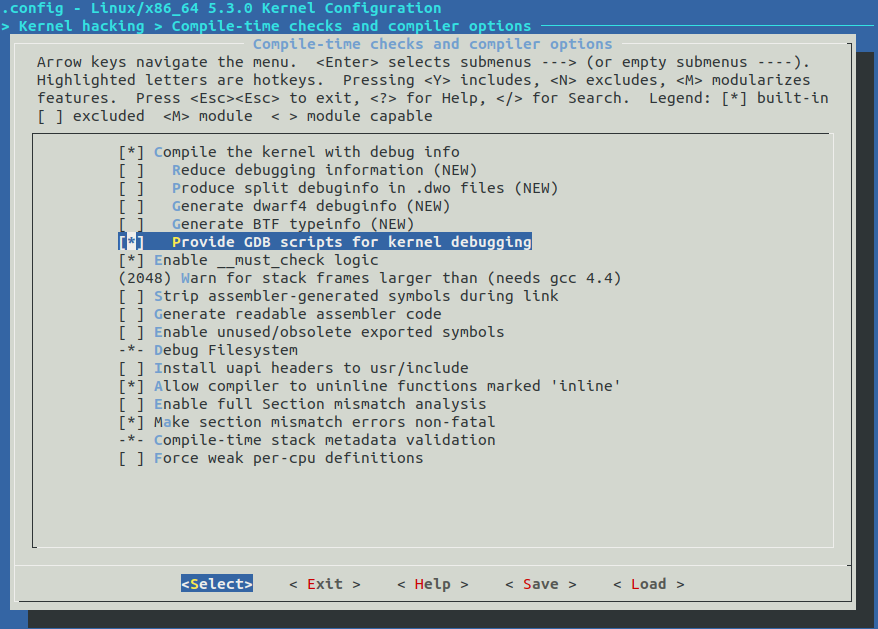
$ make ARCH=x86_64 menuconfig # add debugging ability in TUI
Kernel hacking --->
Compile-time checks and compiler options --->
[*] Compile the kernel with debug info
[*] Provide GDB scripts for kernel debugging (New)
[ ] Reduce debugging information
$ lsmod # list out modules says, want to modify e1000e
says, want to modify e1000
| ...... e1000e 123456 0 ...... |
THEN EITHER,
$ git grep e1000e -- '*Makefile' # search the module path
OR
$ modinfo e1000e # find module path
| filename: /lib/modules/X.X.X-XX-generic/kernel/drivers/net/ethernet/intel/e1000e/e1000e.ko version: 3.2.6-k license: GPL v2 description: Intel(R) PRO/1000 Network Driver ...... |
so, the path is drivers/net/ethernet/intel/e1000e
THEN,
$ vim drivers/net/ethernet/intel/e1000e/*.c # open all c files & find probe function
so, the path is drivers/net/ethernet/intel/e1000add a line to printk() to probe function for TESTing,
THEN,
$ vim drivers/net/ethernet/intel/e1000/*.c # open all c files & find probe function
| struct e1000_hw *hw; # search for probe function by "/probe" in vi ..... static int e1000_probe(struct pci_dev *pdev, const struct pci_device_id *ent) { struct net_device *netdev; struct e1000_adapter *adapter; struct e1000_hw *hw; printk(KERN_DEBUG "DEBUG: Passed %s %d \n",__FUNCTION__,__LINE__); const struct e1000_info *ei = e1000_info_tbl[ent->driver_data]; ..... |
- without debugger:
$ qemu-system-x86_64 -kernel arch/x86/boot/bzImage \
-boot c -m 2049M -hda ../buildroot/output/images/rootfs.ext4 \
-append "root=/dev/sda rw console=ttyS0,115200 acpi=off nokaslr" \
-serial stdio -display none
- with debugger:
$ qemu-system-x86_64 -s -kernel arch/x86/boot/bzImage \
-boot c -m 2049M -hda ../buildroot/output/images/rootfs.ext2 \
-append "root=/dev/sda rw console=ttyS0,115200 acpi=off nokaslr" \
-serial stdio -display none
Login as root (id = root, no passowrd)
# mkdir home # home directory not created by default
# adduser newuser # create normal user account
# exit
login as newuser
/DEBUG: Passed
| [ 2.093005] [ 2.114507] DEBUG: Passed e1000_probe 926 c |

![[pic-1] Text-Based UI Linux Kernel Configuration tool](https://miro.medium.com/max/888/1*vLDNMaC6RTD-gYOiocf39w.png)